
Are you looking to maximize your solar power generation with multiple EcoFlow panels? Connecting two EcoFlow solar panels together can significantly boost your energy harvesting, but it’s crucial to do it correctly to ensure optimal performance and safety. A simple parallel connection is all it takes to get started, but understanding the details will unlock the full potential of your setup.
This comprehensive guide will walk you through everything you need to know about connecting two EcoFlow solar panels, from compatible models and necessary accessories to step-by-step instructions, troubleshooting tips, and safety precautions. By the end of this article, you’ll be confidently harnessing the power of the sun with your EcoFlow panels.
Understanding EcoFlow Solar Panel Compatibility
Before connecting your panels, it’s vital to confirm compatibility. EcoFlow offers various solar panels, and most are designed to work seamlessly together.
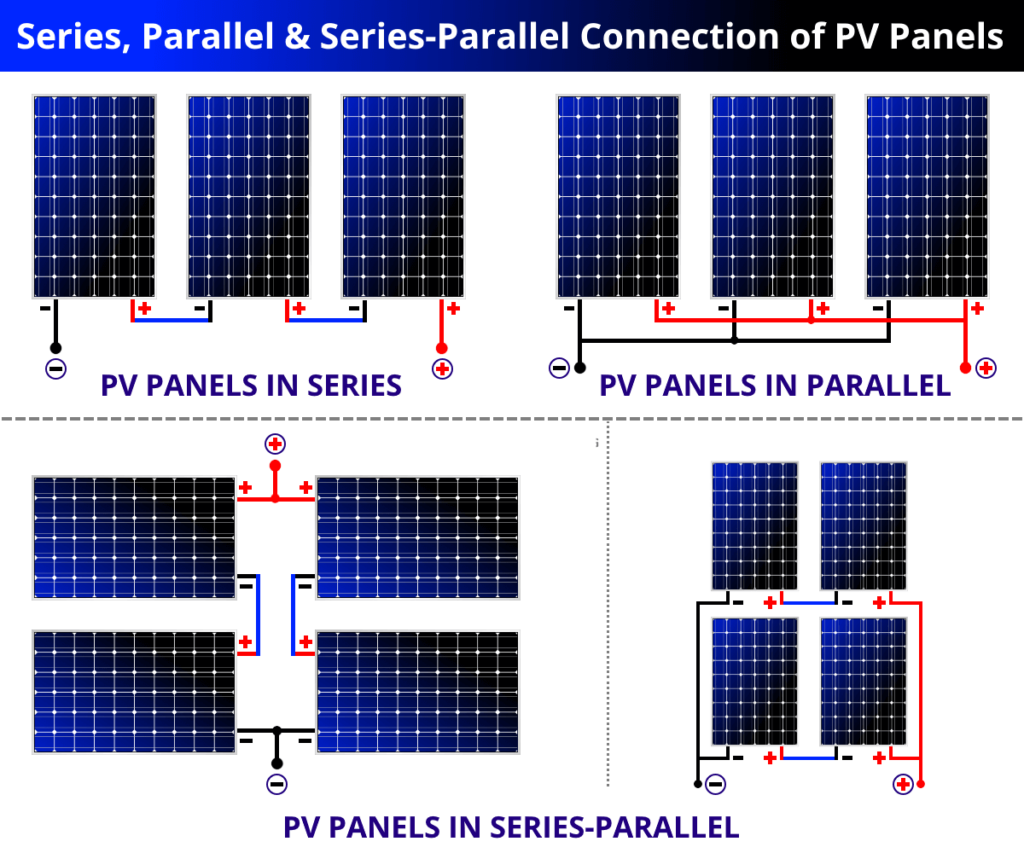
- Parallel Connection: The standard method for connecting EcoFlow panels is in parallel. This maintains the voltage while adding the wattage. This is compatible with most EcoFlow power stations and portable power stations.
- Compatible Models: Generally, all EcoFlow solar panels (110W, 160W, 220W, 400W) can be connected in parallel. However, always check the specifications of your specific panels and power station on the official EcoFlow website.
- Maximum Input: Verify the maximum solar input your EcoFlow power station can handle. Exceeding this limit won’t damage the station, but the excess power won’t be utilized.
What You’ll Need for Connecting EcoFlow Solar Panels
Connecting two EcoFlow solar panels is straightforward, requiring minimal tools and accessories.
| Item | Quantity | Specifications |
|---|---|---|
| EcoFlow Solar Panels | 2 | Any compatible EcoFlow model |
| MC4 Connectors | 4 | Typically included with EcoFlow panels, ensure they are in good condition. |
| MC4 Extension Cables (Optional) | As needed | To reach the power station if the panels are far away. |
| EcoFlow Power Station | 1 | Compatible model with sufficient input capacity |
| Wrench (Optional) | 1 | May be needed to tighten MC4 connectors |
| Gloves (Recommended) | 1 Pair | For safety when handling electrical connectors |
Step-by-Step Connection Process
Follow these steps to connect your EcoFlow solar panels safely and effectively.
Phase 1: Preparation
- Safety First: Work in a dry environment and avoid connecting panels during peak sunlight hours to minimize the risk of electrical shock. Wear gloves for added safety.
- Panel Placement: Position the solar panels in a location that receives direct sunlight, angled optimally for your latitude and time of year.
- Connector Inspection: Examine the MC4 connectors on both panels and the connecting cable to the power station. Ensure they are clean, dry, and undamaged.
Phase 2: Parallel Connection
- Connecting the Positive Terminals: Connect the positive (+) connector from the first panel to the positive (+) connector on the power station’s solar input cable using an MC4 connector.
- Connecting the Negative Terminals: Connect the negative (-) connector from the first panel to the negative (-) connector on the power station’s solar input cable using an MC4 connector.
- Adding the Second Panel (Parallel): Connect the positive (+) connector from the second panel to the positive (+) connector already connected to the power station’s solar input cable. (This is the key to a parallel connection).
- Complete the Circuit: Connect the negative (-) connector from the second panel to the negative (-) connector already connected to the power station’s solar input cable.
Phase 3: Testing and Verification
- Power Station Activation: Turn on your EcoFlow power station.
- Solar Input Check: On the power station’s display, verify that the solar input is registering power from the panels. The wattage should be approximately the combined wattage of the two panels (e.g., two 220W panels should show around 440W under ideal conditions).
- Angle Adjustment: Fine-tune the angle of the panels to maximize power output.
Troubleshooting Common Connection Issues

If you encounter problems during the connection process, here are some common issues and solutions:
- No Solar Input:
- Check Connectors: Ensure all MC4 connectors are securely fastened.
- Inspect Cables: Look for any damage to the MC4 cables.
- Sunlight: Confirm the panels are receiving direct sunlight.
- Power Station Limit: Verify you haven’t exceeded the power station’s maximum solar input.
- Low Solar Input:
- Panel Angle: Adjust the panel angle for optimal sunlight exposure.
- Shading: Remove any obstructions causing shade on the panels.
- Panel Condition: Check for dirt or debris on the panel surface.
- Error Message on Power Station: Consult the EcoFlow power station’s user manual for specific error code explanations and troubleshooting steps.
Pro Tips for EcoFlow Solar Panel Connection
- Use High-Quality MC4 Connectors: Invest in durable MC4 connectors for long-term reliability.
- Cable Management: Secure the MC4 cables to prevent tripping hazards and protect them from damage.
- Extension Cables: When using extension cables, choose ones specifically designed for solar panels with the correct gauge to minimize power loss.
- Regular Inspection: Periodically inspect the connections and cables for wear and tear.
- Panel Cleaning: Clean the panels regularly with a soft cloth and water to maintain optimal efficiency.
- Optimize Angle: Use a solar angle meter or app to find the ideal angle for your location and season.
When to Seek Professional Help
While connecting EcoFlow panels is generally straightforward, certain situations warrant professional assistance:
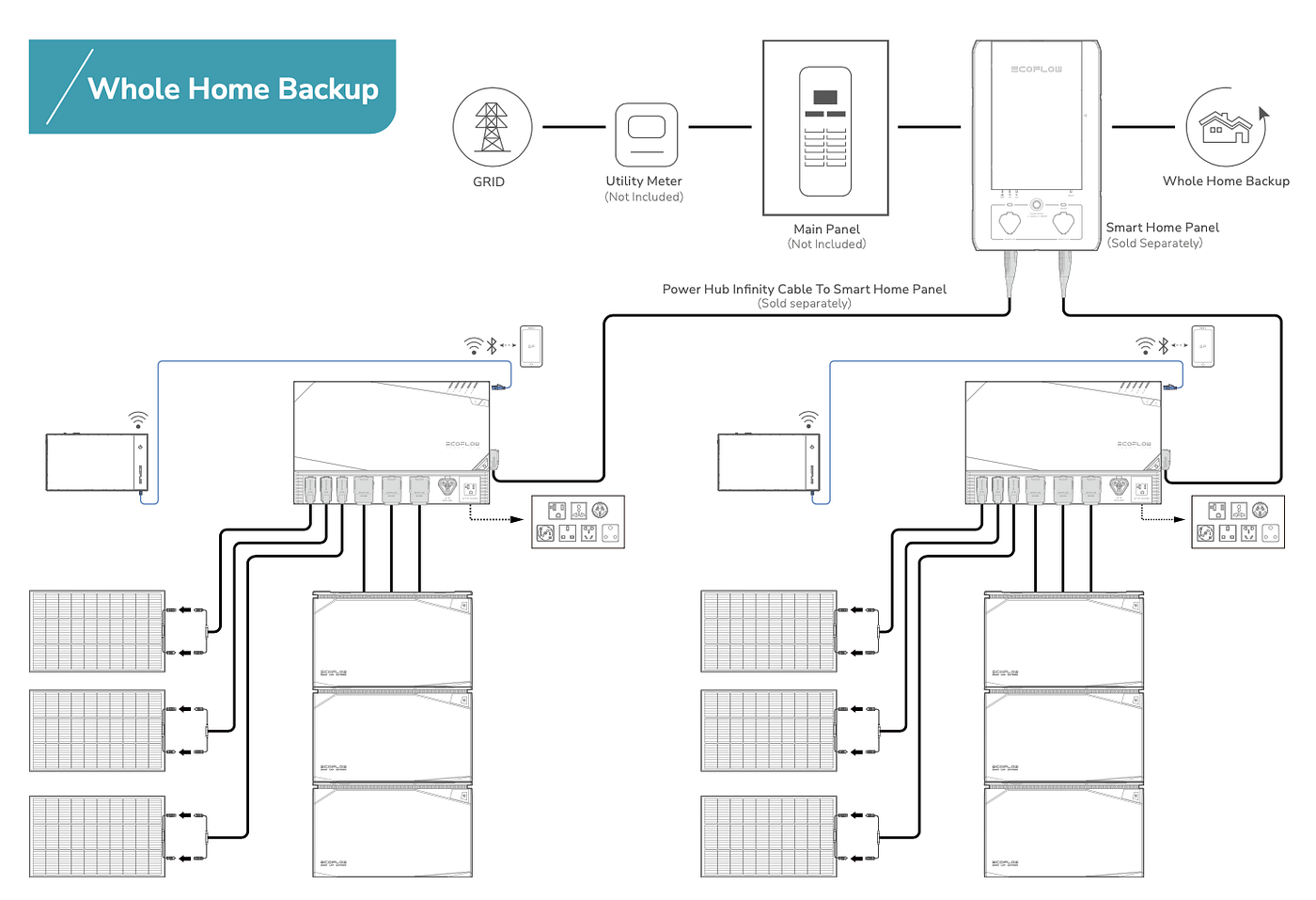
- Complex Installations: If you’re connecting multiple panels in a series-parallel configuration or integrating with other energy systems.
- Electrical Issues: If you suspect any electrical problems with the panels, cables, or power station.
- Roof Mounting: If you’re planning to mount the panels on a roof, it’s best to hire a qualified installer to ensure safety and compliance with local regulations.
FAQ
Q: Can I connect more than two EcoFlow solar panels together?
A: Yes, you can connect multiple EcoFlow panels in parallel, as long as you stay within the maximum input limits of your power station.
Q: What is the difference between a parallel and series connection?
A: In a parallel connection, the voltage remains the same while the amperage (and therefore wattage) adds up. In a series connection, the voltage adds up while the amperage remains the same. EcoFlow panels are designed for parallel connections.
Q: Can I use third-party MC4 connectors with EcoFlow panels?
A: While technically possible, it’s recommended to use EcoFlow-approved MC4 connectors to ensure compatibility and optimal performance.
Q: Will connecting multiple panels significantly reduce charging time?
A: Yes, connecting multiple panels will substantially reduce the charging time of your EcoFlow power station, especially in optimal sunlight conditions.
Enjoy Your Expanded Solar Power!
By following this guide, you’ve successfully connected two EcoFlow solar panels, doubling your potential energy harvest. This setup allows you to power more devices for longer, making your EcoFlow power station even more versatile and reliable. Remember to prioritize safety, regularly inspect your connections, and enjoy the benefits of clean, renewable energy!
Have you successfully connected your EcoFlow solar panels? Share your experience and any tips in the comments below to help other readers!