
Are you frustrated with slow charging times or unsure about the best way to charge your EcoFlow Delta Pro 3? It’s a common concern – maximizing the potential of this powerful portable power station depends on understanding its charging capabilities. The quickest way to get power flowing is to use the AC adapter, but there are several other options available.
This comprehensive guide will walk you through all the charging methods for your Delta Pro 3, from the fastest AC charging to solar and car charging. We’ll cover troubleshooting common issues, maximizing charging efficiency, and keeping your power station in top condition. By the end of this article, you’ll be confident in getting your Delta Pro 3 charged quickly and reliably, no matter where you are.
Understanding EcoFlow Delta Pro 3 Charging Options
The EcoFlow Delta Pro 3 offers a variety of charging methods to suit different situations. Here’s a breakdown:
- AC Wall Charging: The fastest and most common method, utilizing the included AC adapter.
- Solar Charging: Harness the power of the sun for off-grid charging.
- Car Charging: Convenient for on-the-go charging while traveling.
- EcoFlow Smart Generator: A gasoline-powered generator that automatically tops up your Delta Pro 3 when needed.
Most Common Causes of Slow Charging
- Incorrect AC Adapter: Using a non-EcoFlow or incompatible AC adapter.
- Low Temperature: Battery performance and charging speed are reduced in cold temperatures.
- Simultaneous Usage: Using the Delta Pro 3 while charging significantly slows down the process.
- Cable Issues: A damaged or low-quality charging cable.
- Solar Input Limitations: Insufficient sunlight or mismatched solar panel specifications.
How to Charge Your EcoFlow Delta Pro 3 with Each Method
### Method 1: AC Wall Charging (Fastest)
This is the quickest way to fully charge your Delta Pro 3.
Diagnosing the Issue
Ensure the AC adapter is the official EcoFlow Delta Pro 3 adapter and the outlet is functioning correctly.
Fix Steps
- Connect the AC Adapter: Plug the AC adapter into the Delta Pro 3’s AC charging port.
- Plug into Wall Outlet: Connect the adapter to a grounded wall outlet.
- Check the Display: The Delta Pro 3’s display will show the charging status and estimated time remaining.
- Charging Time: Expect a full charge in approximately 1.8 – 2 hours.
Testing
Monitor the display to confirm charging is progressing. If no charging is indicated, try a different outlet or cable.
### Method 2: Solar Charging (Off-Grid)
Ideal for camping, remote locations, or emergency power.
Diagnosing the Issue
Verify your solar panels are compatible with the Delta Pro 3’s input specifications (see table below). Check for shading or obstructions blocking sunlight.
Fix Steps
- Connect Solar Panels: Connect the solar panels to the Delta Pro 3 using MC4 connectors.
- Optimal Placement: Position the solar panels to directly face the sun.
- Monitor Charging: The Delta Pro 3’s display will show the solar input wattage and charging status.
- Charging Time: Varies significantly based on sunlight and panel wattage (approximately 6-12 hours for a full charge with optimal conditions).
Testing
Adjust panel angle throughout the day to maximize sunlight exposure.
### Method 3: Car Charging (On-the-Go)
Convenient for road trips or when access to an outlet is limited.
Diagnosing the Issue
Ensure your vehicle has a functioning 12V car outlet.
Fix Steps
- Connect Car Charger: Plug the EcoFlow car charger into the Delta Pro 3’s DC charging port.
- Plug into Car Outlet: Insert the car charger into your vehicle’s 12V outlet.
- Check the Display: Monitor the Delta Pro 3’s display for charging status.
- Charging Time: A very slow method – expect upwards of 24 hours for a full charge.
Testing
Ensure the car is running to maintain a stable voltage.
### Method 4: EcoFlow Smart Generator (Automatic Top-Up)
For extended power needs when other options aren’t available.
Diagnosing the Issue
Ensure the Smart Generator is properly fueled and functioning.
Fix Steps
- Connect Smart Generator: Connect the Smart Generator to the Delta Pro 3’s AC port.
- Configure Settings: Set the Delta Pro 3 to automatically start the generator when the battery level drops below a specified percentage.
- Monitor Operation: The Delta Pro 3 will automatically manage generator operation to maintain battery charge.
Testing
Verify the generator starts and stops as configured.
EcoFlow Delta Pro 3 Charging Specifications
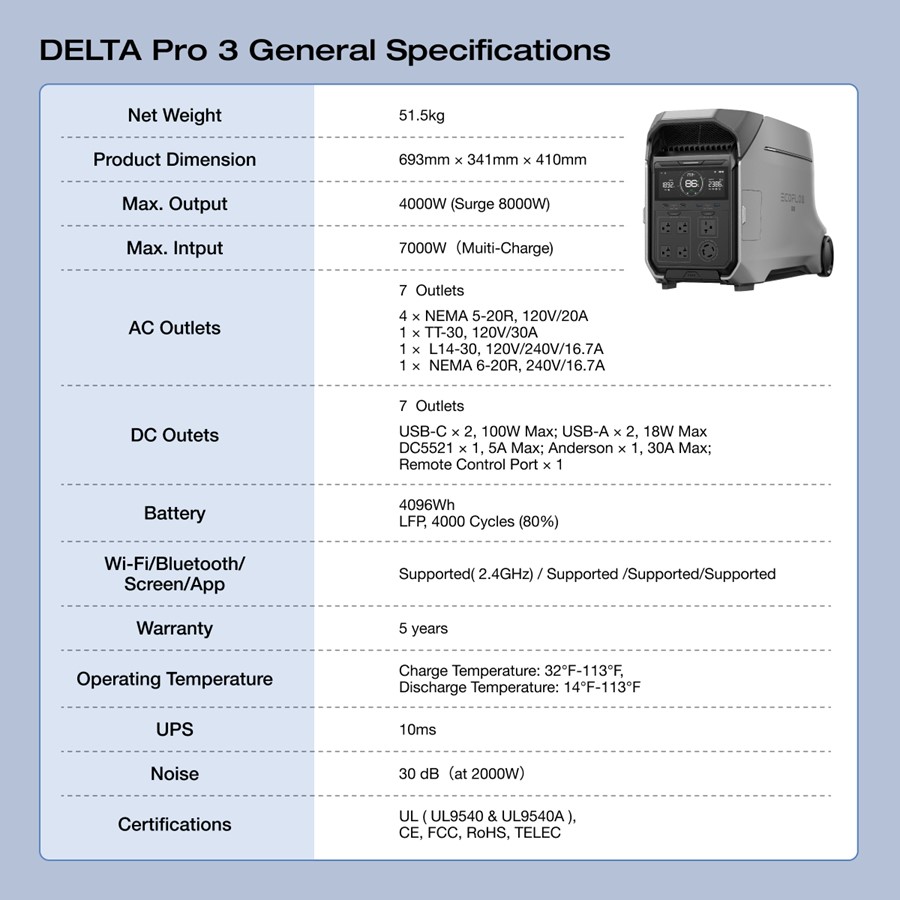
| Charging Method | Input Voltage | Max Input Power | Charging Time (Approx.) |
|---|---|---|---|
| AC Wall Charger | 100-240V AC | 1800W | 1.8 – 2 hours |
| Solar | 11-100V DC, 13A | 800W | 6-12 hours (optimal conditions) |
| Car Charger | 12V/24V DC | 100W | 24+ hours |
| EcoFlow Smart Generator | 120V/240V AC | 1800W | Varies based on generator fuel |
Pro Tips for Optimizing EcoFlow Delta Pro 3 Charging
- Keep it Warm: Charge in a temperature between 41°F (5°C) and 113°F (45°C) for optimal performance.
- Avoid Simultaneous Use: Don’t use the Delta Pro 3 while charging whenever possible.
- Use Quality Cables: Invest in high-quality charging cables to ensure efficient power transfer.
- Maximize Solar Exposure: Regularly adjust the angle of your solar panels to track the sun.
- Update Firmware: Keep the Delta Pro 3’s firmware updated to benefit from the latest performance improvements.
- Store Properly: When not in use, store the Delta Pro 3 at around 50% charge in a cool, dry place.
When to Seek Professional Help
- Charging Port Damage: If the charging port is physically damaged.
- Battery Issues: If the Delta Pro 3 won’t hold a charge or displays error messages related to the battery.
- Internal Malfunctions: If the unit is not responding or behaving erratically.
Contact EcoFlow support or a qualified technician for repair.
FAQ
Q: Can I use a third-party AC adapter with my Delta Pro 3?
A: While it might work, it’s strongly discouraged. Using a non-EcoFlow adapter could damage the unit or void your warranty. Always use the official EcoFlow AC adapter.
Q: What solar panels are compatible with the Delta Pro 3?
A: Panels with an MC4 connector and a voltage range of 11-100V DC are compatible. Ensure the combined wattage doesn’t exceed 800W.
Q: How do I know if my solar panels are charging the Delta Pro 3?
A: The Delta Pro 3’s display will show the solar input wattage. If it’s displaying 0W, check your connections, panel positioning, and sunlight conditions.
Q: Can I charge the Delta Pro 3 and discharge it at the same time?
A: Yes, you can pass-through charge, but it will significantly reduce the charging speed and potentially shorten the battery’s lifespan over time.
Get Your EcoFlow Delta Pro 3 Working Again
By following these guidelines, you can confidently charge your EcoFlow Delta Pro 3 using the method that best suits your needs. Remember to prioritize using the official EcoFlow AC adapter, optimize solar exposure, and avoid simultaneous usage for the fastest and most efficient charging experience.
Have you successfully charged your Delta Pro 3 using one of these methods? Share your tips and experiences in the comments below to help other EcoFlow users!