

Are you frustrated with your Goal Zero Yeti Pro 4000 not powering on, charging slowly, or displaying error codes? It’s incredibly disheartening to invest in a premium power station only to encounter issues. Fortunately, many common problems with the Yeti Pro 4000 have straightforward solutions, and a quick reset often gets things back on track.
This comprehensive guide will take you through a deep dive into the most frequent issues owners face with their Yeti Pro 4000. We’ll cover everything from simple fixes like checking connections to more complex troubleshooting steps, including understanding error codes and when to contact Goal Zero support. By the end of this article, you’ll be equipped to diagnose and resolve most problems, ensuring your Yeti Pro 4000 is ready for your next adventure.
Common Causes of Goal Zero Yeti Pro 4000 Problems
The Yeti Pro 4000 is a sophisticated device, and issues can stem from several sources. Here’s a breakdown of the most common culprits:
Overload Protection
The Yeti Pro 4000 has built-in overload protection. Exceeding the maximum output wattage (4000W) will trigger a shutdown to protect the unit. This is a safety feature, not a malfunction.
Low Battery
A depleted battery can prevent the unit from powering on or accepting a charge. It’s a common issue, especially after extended periods of storage or heavy use.
Incorrect Charging Setup
Using the wrong charger, damaged cables, or incompatible solar panels can hinder charging.
Software Glitches
Like any electronic device, the Yeti Pro 4000 can experience temporary software glitches that cause unexpected behavior.
Temperature Issues
Operating the Yeti Pro 4000 outside its optimal temperature range (62°F – 86°F / 17°C – 30°C) can affect performance and even trigger safety shutdowns.
How to Fix Goal Zero Yeti Pro 4000 Problems
Let’s move on to resolving these common issues. We’ll start with the easiest fixes and progress to more advanced troubleshooting.
Method 1: Basic Reset & Connection Check (Quick Fix)
This is the first thing you should try for almost any issue.
Diagnosing the Issue
Before resetting, visually inspect all connections: AC inputs, DC inputs, USB ports, and any connected devices. Ensure everything is securely plugged in.
Fix Steps
- Power Off: Completely power down the Yeti Pro 4000 by pressing and holding the power button for several seconds until the screen goes blank.
- Disconnect Everything: Unplug all AC adapters, USB devices, and any solar panels connected to the unit.
- Reset: Press and hold the power button for 30-60 seconds. This performs a hard reset, clearing temporary glitches.
- Reconnect & Power On: Reconnect the power adapter and press the power button to turn the Yeti Pro 4000 back on.
Testing
Attempt to charge the unit and power a small device to confirm the reset resolved the issue.
Method 2: Addressing Charging Issues
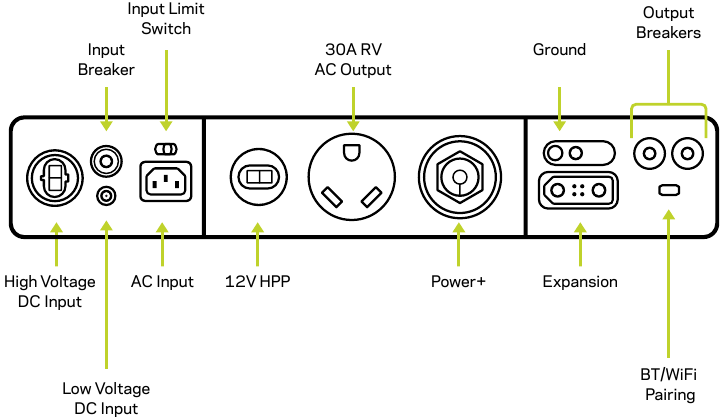
If your Yeti Pro 4000 isn’t charging, here’s a systematic approach:
Diagnosing the Issue
Determine if the issue is with the AC adapter, a solar panel, or the unit itself.
Fix Steps
- AC Adapter Check: Use the original Goal Zero AC adapter. Verify the outlet is working with another device. Check the adapter’s cable for damage.
- Solar Panel Compatibility: Ensure your solar panels are compatible with the Yeti Pro 4000’s MPPT charge controller (maximum input voltage of 60V and 1200W).
- Solar Cable Inspection: Inspect the solar cables for any damage or loose connections.
- Charge Port Check: Try charging through a different charging port (AC and DC ports).
Testing
Monitor the Yeti Pro 4000’s display to see if it registers an incoming charge.
Method 3: Resolving Overload Errors

If the Yeti Pro 4000 is shutting down due to overload:
Diagnosing the Issue
Identify which devices are connected and calculate their total wattage. Remember to account for surge wattage (the initial power draw when a device starts up).
Fix Steps
- Reduce Load: Disconnect some devices to bring the total wattage below 4000W.
- Prioritize Devices: Connect only essential devices.
- Check Device Wattage: Verify the wattage listed on each device to ensure accurate calculations.
Testing
Reconnect devices one by one, carefully monitoring the Yeti Pro 4000’s display for overload warnings.
Prevention Tips and Maintenance Advice

Preventative maintenance can significantly reduce the likelihood of problems.
- Store Properly: When not in use, store the Yeti Pro 4000 in a cool, dry place, away from direct sunlight.
- Regular Charging: Charge the Yeti Pro 4000 every 3-6 months, even if not in use, to maintain battery health.
- Avoid Extreme Temperatures: Do not operate or store the unit in extreme temperatures.
- Keep Vents Clear: Ensure the Yeti Pro 4000’s vents are unobstructed for proper cooling.
- Firmware Updates: Check the Goal Zero website for firmware updates and install them when available.
Pro Tips
- Understanding Error Codes: Refer to the Yeti Pro 4000’s manual for a detailed explanation of error codes. These codes provide valuable clues to the nature of the problem.
- Use High-Quality Cables: Investing in high-quality, durable charging cables can prevent connection issues.
- Monitor Battery Health: Regularly check the battery health indicator on the Yeti Pro 4000’s display.
- Avoid Deep Discharge: While the Yeti Pro 4000 is designed to handle deep discharges, frequent full discharges can shorten battery lifespan.
- Solar Panel Angle: Optimize solar panel angle for maximum sunlight exposure throughout the day.
- Use a Surge Protector: When charging from an AC outlet, consider using a surge protector to safeguard the unit from power fluctuations.
- Consider a UPS: If you need uninterrupted power, connect the Yeti Pro 4000 to a UPS (Uninterruptible Power Supply).
Professional Help
Sometimes, issues require professional attention.
- Signs to Seek Help: Persistent error codes, inability to charge despite troubleshooting, physical damage to the unit, or unusual noises.
- Finding a Service Provider: Contact Goal Zero support for authorized service centers in your area.
- Typical Costs: Repair costs vary depending on the issue. Expect to pay for diagnostics, parts, and labor.
- Warranty: The Yeti Pro 4000 comes with a warranty. Check the terms and conditions to see if your issue is covered.
FAQ
Q: Why is my Yeti Pro 4000 not turning on?
A: First, try the basic reset (Method 1). If that doesn’t work, ensure the unit is adequately charged. A completely depleted battery may require several hours to charge before powering on.
Q: Can I use a generator to charge my Yeti Pro 4000?
A: Yes, but use a high-quality generator with clean sine wave output to avoid damaging the unit.
Q: What does the “Overload” error mean?
A: It means the total wattage of the devices connected to the Yeti Pro 4000 exceeds its maximum output capacity. Disconnect some devices to resolve the issue.
Q: How long will the Yeti Pro 4000 take to charge from solar?
A: Charging time depends on the size and efficiency of your solar panels, as well as the amount of sunlight available.
Get Your Goal Zero Yeti Pro 4000 Working Again
By following the steps outlined in this guide, you should be able to diagnose and resolve most common issues with your Goal Zero Yeti Pro 4000. Remember to start with the simplest solutions and work your way towards more complex troubleshooting.
Don’t let a technical glitch ruin your off-grid experience.
Have you successfully fixed your Yeti Pro 4000? Share your experience in the comments below to help other readers!